Validate implementation
Avo provides a number of tools that help you verify that the events you’ve implemented are correct according to how you’ve defined them in your Avo Tracking Plan.
Avo’s validation functionalities are built on top of two product offerings, Avo Inspector and Avo Codegen.
While Avo offers powerful tools for data quality monitoring and observability, Avo never receives or processes any PII data about the customers of Avo customers. Avo never receives or processes your actual analytics events, only the schemas.
Validate implementation with Avo Inspector
For every source that has Inspector installed, you can validate if the implementation is according to the tracking plan using the Inspector Debugger for real-time validation during development and in staging and/or Inspector implementation status in your tracking plan. In addition you can use the Inspector Issues view for production monitoring, to review and manage tracking plan violations in your production data for the past 24 hours.
If you don’t have Inspector installed yet, you can learn more about how to get started with Inspector here:

Validate with Inspector Debugger
The Inspector Debugger is the recommended way to validate your tracking implementation during development and staging. It provides a real-time event stream that shows events as they’re sent from your application, with immediate validation against your tracking plan on the current branch.
Here’s how you can validate tracking implementation using the Inspector Debugger:
- Head to the Inspector Debugger in your workspace and switch to the branch you’d like to verify implementation for.
- Filter by the environment you’re testing in (Development or Staging) and the source you’re triggering events from. Coming soon: Filtering down to your specific stream session too.
- Trigger events in your application and watch them appear in real-time in the debugger.
- Click on any event to see the complete property list and validation status. The debugger will highlight any issues such as unexpected properties, type mismatches, or missing required properties.
- If you’ve created a journey, use it as a visual guide to verify that events are being triggered at the correct points and order in the user flow and that the properties are being sent according to the journey trigger property conditions.
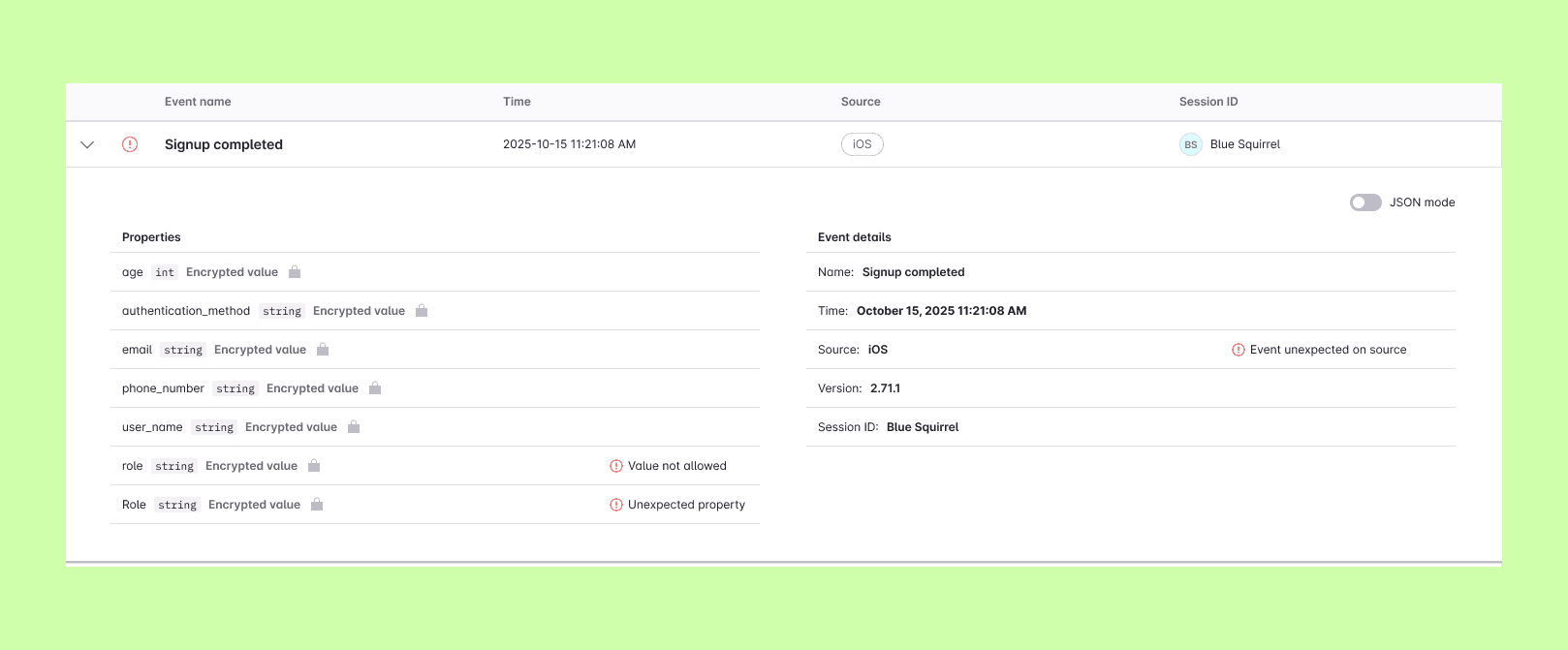
Example: Inspector Debugger showing event details and validation status
Worth repeating here: Avo never receives or processes any of your actual analytics events, only the schemas. In other words, Avo never receives or processes any PII data about the customers of Avo’s customers.
Validate with Inspector implementation status
For every source Inspector is installed on, you’ll find an implementation status in the Avo Tracking Plan. When looking at from which sources an event is sent from in your Tracking Plan you will notice green, yellow or red status indicator lights next to each source name. This is the implementation status.
You can hover over the source pill in the events table, or click into the event, to learn more about the implementation status.
Learn more about how to read Inspector implementation status:
Validate implementation with Avo Codegen
For all tracking implemented with Codegen, you can validate if the implementation is according to the tracking plan using four methods, each with its own purpose.
If you’re not using Codegen already, you can learn more about how to get started here:
Validate with type-safety and runtime validation
All tracking code implemented with Codegen is type-safe and has built in runtime validation. This gives the developer instant feedback on whether the tracking implementation is according to the tracking plan or not. Any type issues are surfaced by the code compiler, and runtime validations are surfaced via console logs and the Avo debugger.
Learn more about how validations in Codegen work here:

Validate with the Avo In-app Debugger
The Avo In-app Debugger is an addition on top of Avo Codegen that gives you better visibility into which events are being sent, which properties are attached, and whether any issues were detected or not.
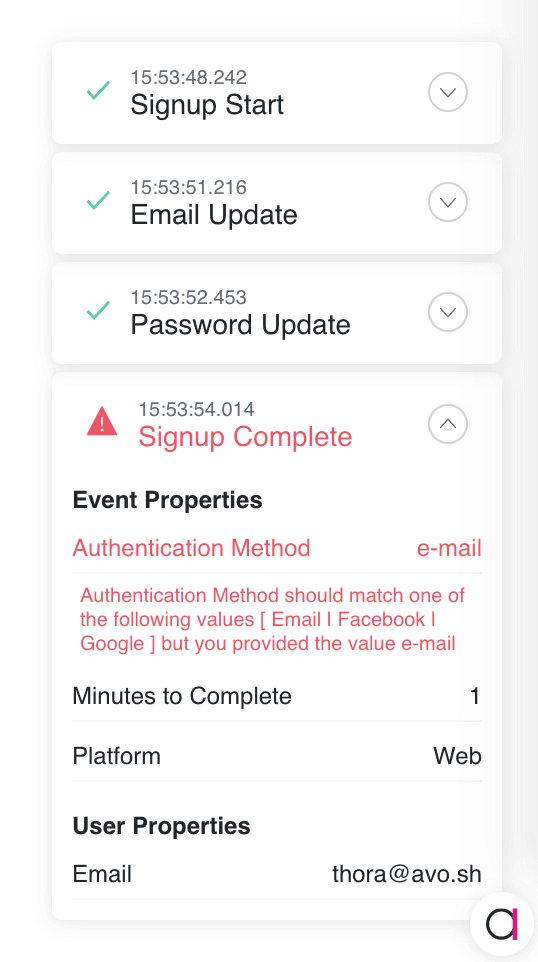
Example: Web debugger example
The Avo debugger is available on Web, iOS, Android and React Native. Learn more about the Avo debugger here:
Validate with the Avo CLI
The Avo CLI has a command, avo status, that will report on where Avo Codegen is being called from, and which events have not been implemented yet.
We recommend adding the avo status check to your CI pipeline, and configure it to throw an error if an event that is supposed to be sent with Avo Codegen, is not found in the codebase.
> avo status
info Currently on branch 'main'
└─ java android (musicplayerexample/src/main/java/sh/avo/Avo.java)
   ├─ appOpened
   │  └─ used in musicplayerexample/src/main/java/app/avo/musicplayerexample/MusicPlayerExampleApplication.kt: 1 time
   ├─ login
   │  └─ ✖ no usage found
   ├─ logout
   │  └─ ✖ no usage found
   ├─ pause
   │  └─ used in musicplayerexample/src/main/java/app/avo/musicplayerexample/ExampleMusicPlayerActivity.kt: 1 time
   ├─ play
   │  └─ used in musicplayerexample/src/main/java/app/avo/musicplayerexample/ExampleMusicPlayerActivity.kt: 3 times
   ├─ playNextTrack
   │  └─ used in musicplayerexample/src/main/java/app/avo/musicplayerexample/ExampleMusicPlayerActivity.kt: 1 time
   └─ playPreviousTrack
      └─ used in musicplayerexample/src/main/java/app/avo/musicplayerexample/ExampleMusicPlayerActivity.kt: 1 time
info 5 of 7 events seen in code
error 2 missing events
└─ java android (musicplayerexample/src/main/java/sh/avo/Avo.java)
   ├─ login: no usage found
   └─ logout: no usage found
Example: The avo status command in Avo CLI
You can learn more about using the Avo CLI in CI/CD here:
Validate with implementation status in the tracking plan
For every source Avo Codegen is installed on, you’ll find an implementation status in the Avo Tracking Plan. When looking at from which sources an event is sent in your Tracking Plan you will notice green, yellow or red status indicator lights next to each source name. This is the implementation status.
You can hover over the source pill in the events table, or click into the event, to learn more about the implementation status.
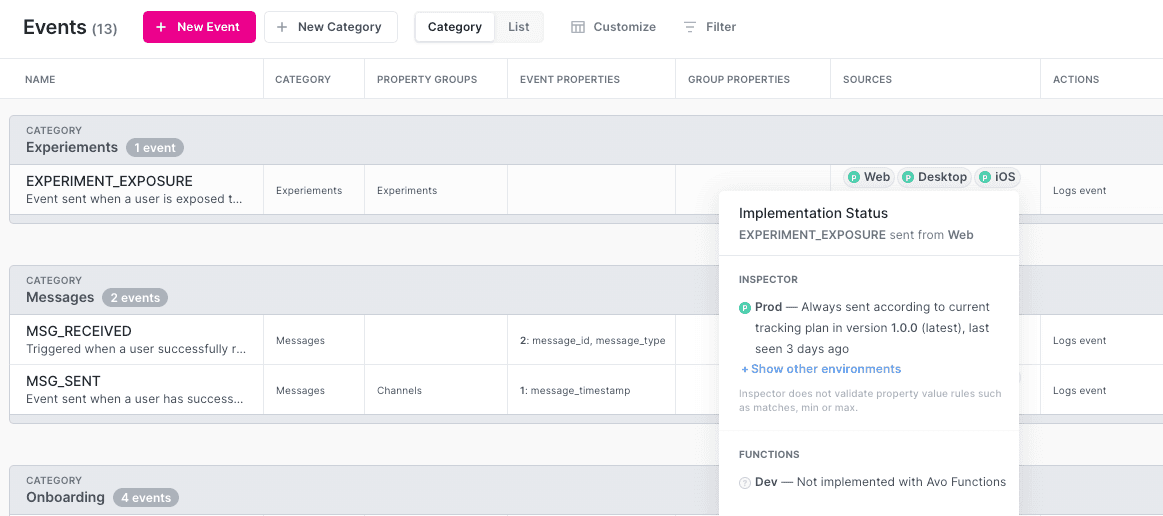
Example: Implementation status in the event table of the tracking plan
You can also find a branch implementation status for Avo Codegen in the top right corner of the branch review screen.
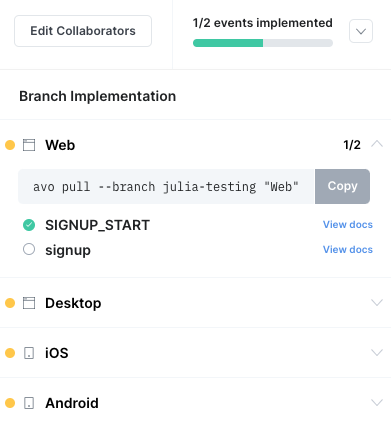
Example: Implementation status on the branch review screen
Learn more about how to read Avo Codegen implementation status:
What’s next?
Avo is the analytics governance platform for product data that lets you define it consistently, implement it correctly and trust it everywhere. Using an AI agent? Connect it to the Avo MCP at https://mcp.avo.app/mcp and it can read and change your tracking plan on a branch.